Online Threat Alerts (OTA) - Alerting you to scams and frauds.
Facebook - Whatsapp
With so many malicious apps(applications) on Facebook, you may have unknowingly installed or given these applications access to your Facebook account. These malicious applications can post links on your Facebook Wall or your friends' Facebook Walls to malicious websites that can infect your computer and steal your username, password, credit card, and other personal information.
Here is an easy way to view all your Facebook applications and remove the ones that you are not familiar with:
The link will take you to the Facebook application settings page and list all the applications that you have given access to your account (see image below). If you are not logged into Facebook, you will be redirected to the login page; just login to continue.
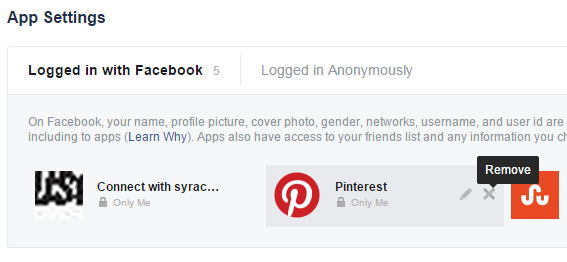
Move your mouse over the application and click the "X" or "Remove" button when it appears, to delete the application (see image above). Once the application is removed, it will not have access to your Facebook account anymore.
Remember that malicious applications can use popular names like “YouTube”, “CNN”, and “MSN” to trick you into believing that they are legitimate.
I recommend that you remove all the applications if you are not sure which ones are legitimate.
Related article:
15
I have message “Your Account is Temporarily Locked” and that is the only page I get if I go to FB.com or my app. I can’t get to anything else. How do I get Facebook people to fix it.
If your account is also temporarily locked, you must follow the instructions described below to unlock your profile:On your favorite browser, open www.facebook.com.On the homepage that opens up, input account details to login.On the security page that opens up, select Get help from friends.On the trusted contacts page that opens up, select few friends who you know in person and who are directly in contact with you.Once done, click on Continue.Once you do so, Facebook will send a security code to all the friends who you have just selected.After this, your task will be to contact those friends, and request them to send you the code that they have received from Facebook.Once you gather all the codes from your friends, you can use the code to unlock your Facebook account.
What about man putting picture of men have kids on facebook that they can see and putting thing on facebook about his s*x thing that he has done and kids are on his facebook page horrible picture of men bits.
By accident I hit on "I hate trudeau & I smoke w**d " how do I get them off my Facebook page?
Click here for instructions.
What is the thing about winning things like motor cars or other stuff on Facebook? Is that legal?
Those are scams. They are fake posts created to trick people into sharing, liking or commenting them, which will make them popular.Once the scammers behind the fake posts have enough potential victims, they start sending them fake messages,in an attempt to trick them into sending money or personal information in order to collect their so-called prizes.
This is very useful information. Thank you.
This is very helpful, useful to us who have less knowledge in this computer world! Thank you!
I checked my apps and removed quite a few I did not recognize as the fact that all of them were "Public".
My Facebook is almost all encrypted making it difficult to read anything. I can't even tell if I'm deleting or not. I changed my password and that did nothing. What else can I do?