The domain name facebookmail.com is used by Facebook to send notifications when they detect an attempt to log in to your account or change a password. Therefore, email addresses like security@facebookmail.com is legitimate, unless it is being spoofed.
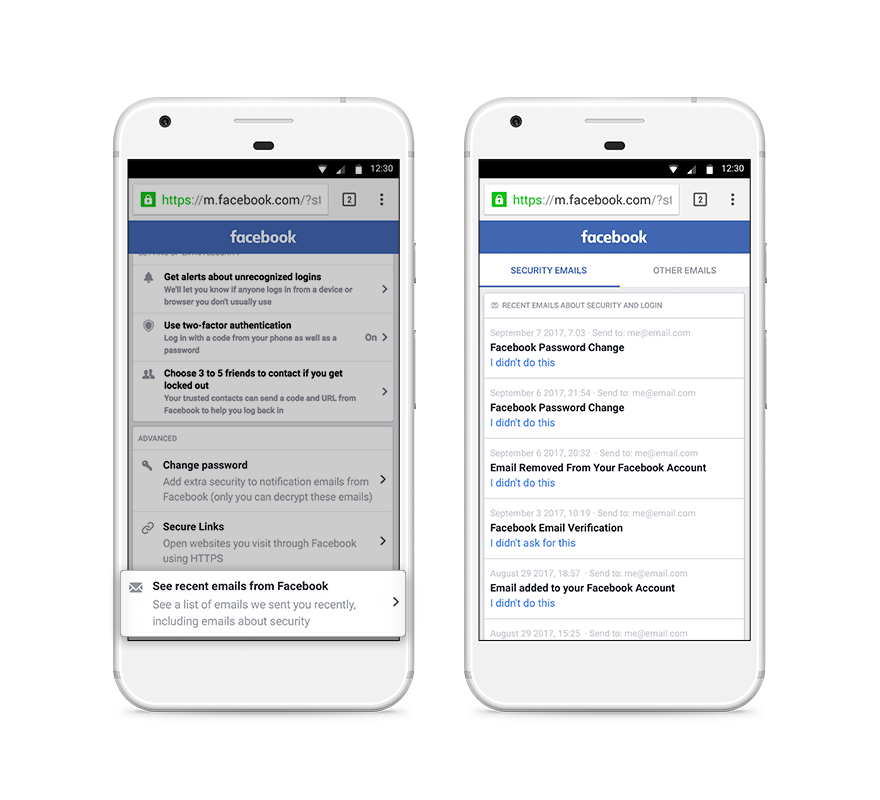
If you're unsure if an email you received was from Facebook, you can check its legitimacy by visiting www.facebook.com/settings to view a list of security-related emails that have been recently sent. If you've checked this tool and determined that an email you received is fake, we encourage you to report it to phish@facebook.com, and if you believe your account has been compromised due to a phishing attempt, you may attempt to regain access to your account at: www.facebook.com/hacked.
Facebook Recent Emails About Security and Login Tool
Facebook will never ask you for your password in an email or send you a password as an attachment.
Scammers sometimes create fake emails that look like they’re from Facebook. These emails often look like:
- Notifications about friend requests, messages, events, photos and videos.
- False claims that you went against our Community Standards.
- Warnings that something will happen to your account if you don't update it or take a certain action.
- Claims or offers that sound too good to be true (such as winning a Facebook Lottery.)
Note: if an email or Facebook message looks strange, don't open it or any attachments. Instead, report it to phish@fb.com or through the report links that appear throughout Facebook.