The "Apple Defender Security Center" popup message below is a scam. The scam, which claims the potential victims' PC has been blocked for security reasons due to spyware or malware threat, is being used by cybercriminals or scammers to frighten and trick potential victims into calling them at a fake Apple Support telephone number. Calling the fake support telephone number will connect potential victims to the scammers, who will pretend to be from Apple. They will attempt to trick their potential victims into disclosing their account credentials, personal and financial information which they will use fraudulently.
The Apple Defender Security Center Scam
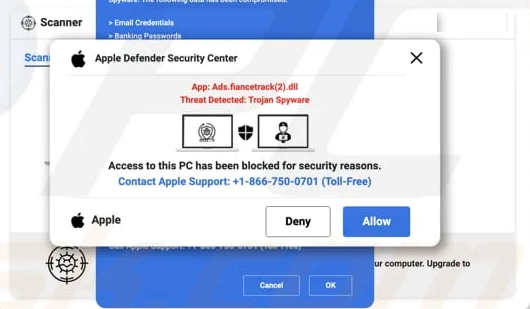
** ACCESS TO THIS PC HAS BEEN BLOCKED FOR SECURITY REASONS **
Your computer has alerted us that it has been infected with a Trojan Spyware. The following data has been compromised.
> Email Credentials
> Banking Passwords
> Facebook Login
> Pictures & Documents
Apple-Defender Scan has found potentially unwanted Adware on this device that can steal your passwords, online identity, financial information, personal files, pictures or documents.
You must contact us immediately so that our engineers can walk you through the removal process over the phone.
Call Apple Support immediately to report this threat, prevent identity theft and unlock access to this device.
Closing this window will put your personal information at risk and lead to a suspension of your Apple Registration.
Call Apple Support: +1-866-750-0701 (Toll Free)
Apple Defender Security Center
App: Ads.fiancetrack(2).dll
Threat Detected: Trojan Spyware
Access to this PC has been blocked for security reasons.
Contact Apple Support: +1-866-750-0701 (Toll Free)
Potential victims will also be asked to give the scammers remote access to their computers, something Apple will never ask their users to do.