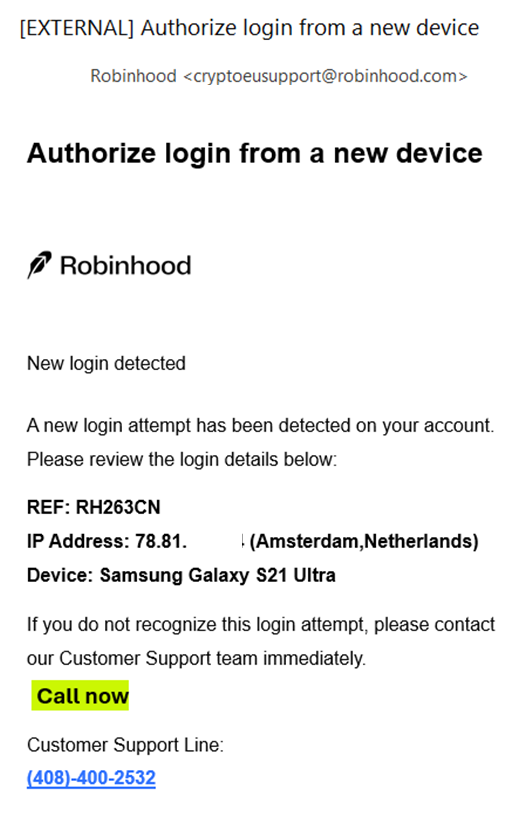
There is a Robinhood scam email that claims an authorized login from a new device was detected. The fake email asks recipients to contact a fake Robinhood customer service telephone operated by scammers. The scammers aim to pose as support agents to steal account credentials or funds.
The Robinhood Email Scam
Common Scam Tactics
- Fake Security Alerts: You receive a polished text or email with official-looking branding and technical jargon (e.g., "API key linked," "IP address detected") to create a sense of urgency.
- Unsolicited Calls: Scammers call you directly, claiming there is an "active threat" to your funds. They may ask for your password, two-factor authentication (2FA) codes, or for you to "secure" your money by transferring it to a new wallet.
- Phishing Links: Messages often include links to fake login pages designed to harvest your credentials.
- Remote Access Requests: Scammers may ask you to download software (like AnyDesk or TeamViewer) to "help" you, which actually gives them full control over your device.
Red Flags to Watch For
- Direct Dial Phone Numbers: Robinhood does not have a direct-dial phone number for customer support. Official phone support is only available via a callback requested through the app.
- Requests for Sensitive Data: Legitimate Robinhood support will never ask for your password, 2FA code, or Robinhood Wallet secret recovery phrase.
- Urgency and Threats: Messages that demand immediate action to prevent "account suspension" or "theft" are standard scam tactics.
- Inauthentic Email Domains: Official emails will always come from a verified Robinhood domain (e.g., @robinhood.com). Beware of variations like @robinh00d.com or support from generic @gmail.com addresses.
Contact Official Robinhood Support
- To avoid scams, always initiate contact through official, verified channels:
- In-App Support: Open the Robinhood app, tap the Account (person) icon → Menu (3 bars) → Robinhood Support → Contact us 24/7.
- Official Website: Visit the Robinhood Contact Page directly.
- Report Phishing: If you receive a suspicious message, forward it to reportphishing@robinhood.com.
If You Have Been Scammed
- Freeze Your Account: Immediately use the in-app chat to request an account freeze by typing "my account is hacked".
- Update Credentials: Change your password and ensure 2FA is enabled using an authenticator app rather than SMS.
- Report to Authorities: Contact your local police and report the incident to the FBI IC3 or the FTC.
You should only contact Robinhood Support through the app or on the web at robinhood.com/contact. When you connect to Robinhood Support through chat or email, they will NEVER ask you for any account login details. Don't search for or use Robinhood phone numbers found through an internet browser, as they may be fraudulent and part of a scam.