Apple Pay customer service scams involve fraudsters impersonating Apple employees to steal your Apple ID, passwords, or two-factor authentication (2FA) codes. A widespread campaign uses fake "fraud alerts" to trick users into calling a malicious phone number.
Scam Tactics
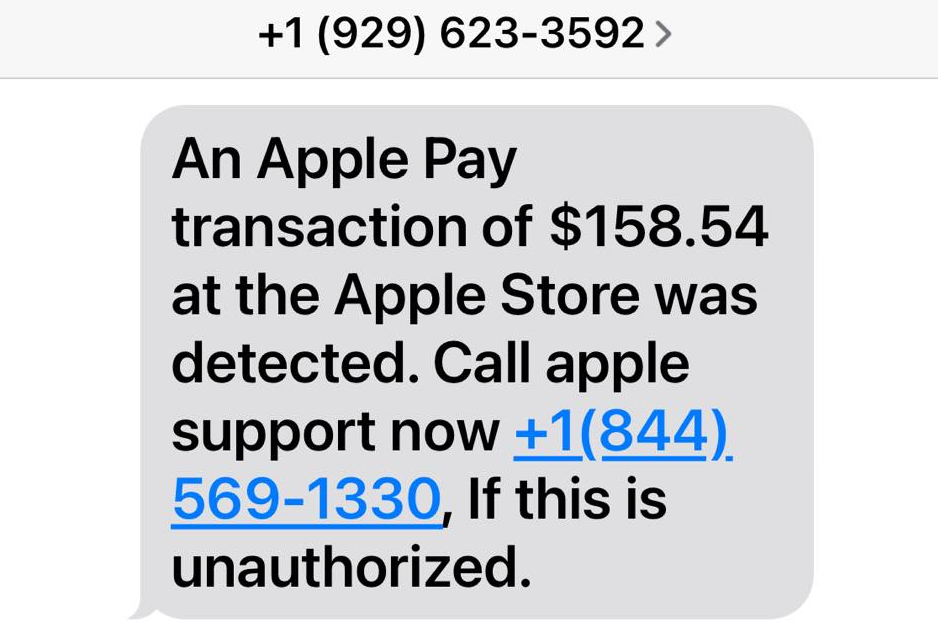
- Fake Fraud Alerts: You receive an email or text claiming a high-value purchase was made via Apple Pay. The message warns you to call a specific number within 24 hours to "cancel" the charge.
- Real Support Ticket Manipulation: Scammers may trigger a genuine Apple password reset or support email to your account and then call you, using the real case number to appear legitimate.
- Verification Code Theft: While on the phone, the scammer triggers a 2FA code on your device and asks you to read it back to "secure your account".
- Remote Access Requests: Fraudsters may ask you to download screen-sharing software to "fix" a security breach, allowing them to see your banking apps or move money.
- Overpayment/Refund Scams: On marketplaces, scammers send a fake receipt for "too much money" and ask you to "refund" the difference using Apple Cash.
Sample Scam
Red Flags to Watch For
- Urgency and Threats: Claims that your account will be "permanently locked" or that you are "liable for fraud" if you don't act immediately.
- Generic Greetings: Messages addressed to "Dear Customer" instead of your actual name.
- Suspicious Sender Addresses: Emails coming from domains that are not @apple.com (e.g., @rambler.ru or support@appl3-pay.com).
- Unsolicited Calls: Apple does not make outgoing calls to users about account issues unless you have specifically requested a callback.
How to Respond and Report
- Do Not Call or Click: If you receive a suspicious alert, do not use the phone number or links provided in the message.
- Verify Directly: Check your actual transaction history in the Apple Wallet app or log in to appleid.apple.com directly.
- Official Support: Contact Apple only through the official Apple Support website or the official app.
- Report Phishing:
- Forward suspicious emails or screenshots of texts to reportphishing@apple.com.
- Forward scam SMS messages to 7726 (in many countries).
- File a report with the Federal Trade Commission (FTC).
If you have already shared information, change your Apple ID password immediately and contact your bank to freeze any linked cards.