Modern scams don't always come with obvious spelling mistakes or suspicious-looking pages. Some use professional designs, familiar logos and realistic customer support messages.
The best defence is knowing what to check before scammers pressure you into acting.
Before You Click: Verify the Message
Phishing scams often begin with a simple request: follow a link, confirm a payment or open an attachment.
The message might appear to come from a delivery company, bank, retailer or government agency. Some even refer to real orders or personal details, making them seem more convincing.
Before clicking, ask yourself:
- Was I expecting this message? An unexpected delivery fee or password reset deserves closer inspection.
- Is someone creating urgency? Threats of account closure or immediate penalties are common pressure tactics.
- Can I verify it independently? Open the company's official app or website yourself rather than following the supplied link.
Be particularly cautious with sponsored search results and social media advertisements. Paying for an advertisement does not prove that a seller is genuine.
If a message appears to come from someone you know, contact them through a different, previously trusted channel before acting.
Before You Enter Details: Check the Website and Connection
Fake websites can closely imitate legitimate shops, banks and login portals.
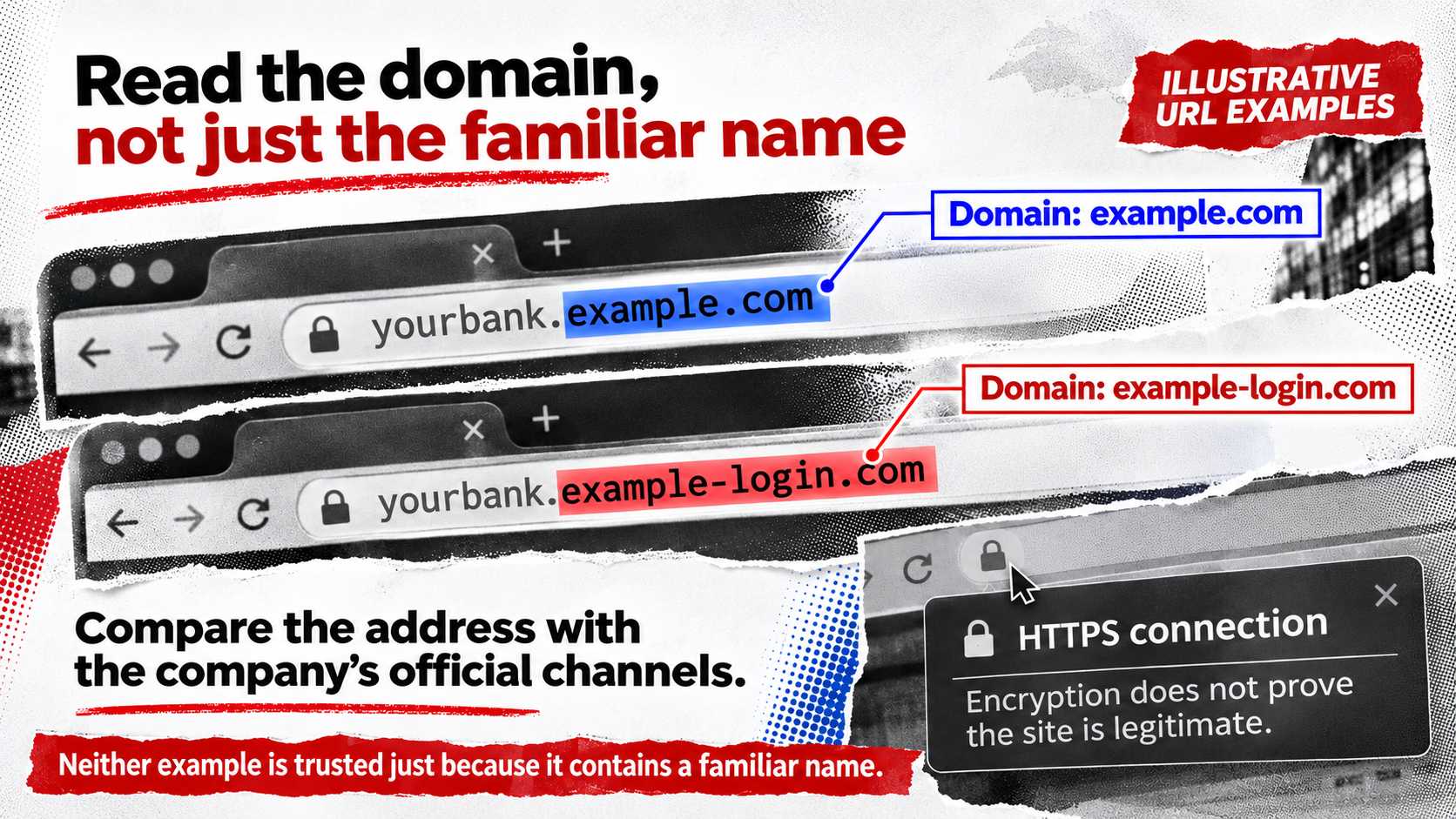
Look carefully at the address bar. A familiar brand name somewhere inside a long URL does not mean the website belongs to that brand.
For example, yourbank.example.com and yourbank.example-login.com are different domains. The first is a subdomain of example.com, while the second belongs to example-login.com. Neither should be trusted simply because it contains a familiar name.
Compare the address with the one published through the company's official channels. Even a correctly spelled domain is not, by itself, proof that a website is trustworthy.
HTTPS is also important, but it is often misunderstood.
It encrypts communication between your browser and the website, helping protect data in transit. However, it does not guarantee that the organisation operating the website is legitimate. Scammers can use HTTPS too.
Your network connection deserves attention as well, particularly when using hotel, airport or café Wi-Fi.
Verify the network name with the venue and avoid unexpected requests to install software or certificates.
A VPN can add connection privacy by encrypting traffic routed through its tunnel between your device and a VPN server. If you're considering a VPN for unfamiliar networks, you can explore X-VPN to see what the service offers.
However, a VPN cannot identify a fake retailer or prevent you from typing a password into a phishing page. Website verification remains essential.
Before You Pay: Look Beyond the Padlock
A professional checkout page is not proof that an online store is trustworthy.
Before placing an order, check the retailer's contact information, delivery policy and refund conditions. Search independently for recent complaints, especially when the offer seems unusually cheap.
Be especially cautious if an unfamiliar seller insists on gift cards, cryptocurrency or bank transfers, particularly when the payment offers limited buyer protection or the seller pressures you to act immediately.
Credit cards may provide stronger dispute options for certain purchases, depending on your location, card issuer and the type of transaction.
If a seller suddenly changes bank details or asks for a second payment to release an order, pause and verify the request through established contact information.
The US Federal Trade Commission recommends contacting businesses independently when unexpected messages request personal or payment information.
Before You Download: Confirm the Software Source
Fake software updates and security warnings can be just as dangerous as fraudulent shopping pages.
A pop-up might claim that your computer is infected and instruct you to download a repair tool immediately.
Instead of following the pop-up, close it and check your operating system's security settings or the relevant developer's official support website.
Use official app stores and verified developer download pages whenever possible.
For example, someone choosing X-VPN can obtain the appropriate application through official X-VPN downloads, rather than trusting an installer attached to an unsolicited email.
Before installing unfamiliar software, check the developer's name, requested permissions and whether the application matches your device. Be especially careful when several apps have similar names or icons.
Keep your browser, operating system and security software updated. Security fixes can address vulnerabilities that attackers might otherwise exploit.
Protect the Accounts Scammers Want
Even careful browsing cannot eliminate every threat. Strong account security helps limit the damage if a password is exposed.
Start with your email account. Because it often controls password recovery for other services, losing access to email can create a chain of problems.
Use a password manager to create unique passwords, and enable multifactor authentication on important accounts.
Where available, passkeys or FIDO2-compatible security keys can provide stronger protection against phishing than manually entered verification codes.
Never share one-time login codes with someone claiming to be from customer support.
Review account recovery details periodically, including unfamiliar devices, active sessions and connected applications.
If you discover that a password has been exposed and you've reused it elsewhere, change it on those accounts too.
What If You've Already Clicked or Paid?
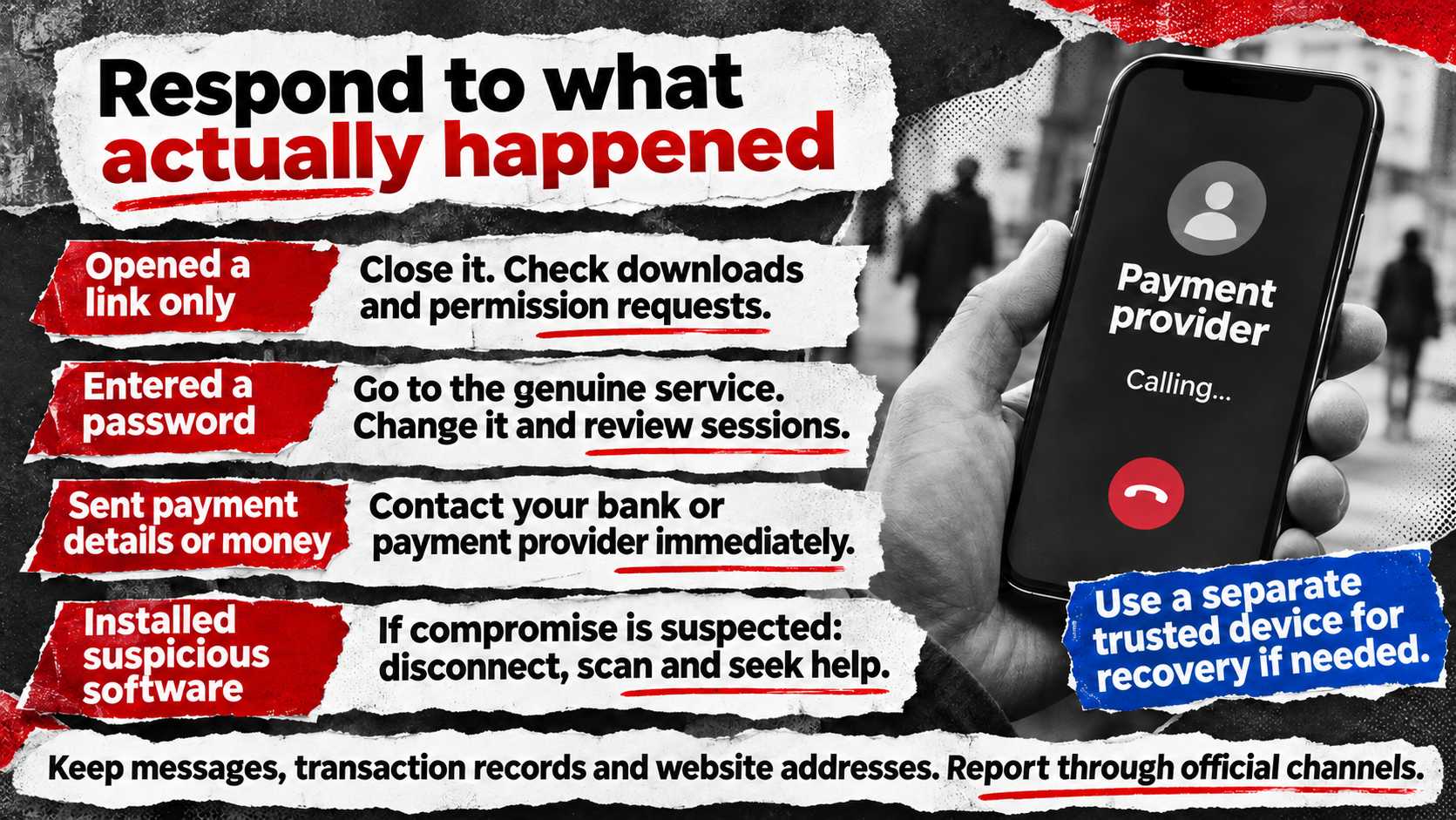
Act according to what actually happened. Simply opening a suspicious page is different from submitting credentials, downloading software or transferring money.
If you only opened a suspicious link: Close the page without entering information or downloading anything. Check for unexpected downloads, permission requests or security warnings. Keep your browser and operating system updated, and investigate any unusual device behaviour.
If you entered a password: Visit the genuine service directly, change the compromised password, review active sessions and enable stronger authentication. Check other accounts if you've reused the same password.
If you supplied payment details or transferred money: Contact your bank, card issuer or payment provider immediately. Explain what happened and ask about account protection, transaction disputes and possible recovery options.
If you installed suspicious software: If you suspect compromise, disconnect the affected device from the network, run an up-to-date security scan and seek professional help where necessary. Use a separate trusted device for sensitive account recovery if the original device may be infected.
If you disclosed personal information: Monitor relevant accounts and follow the identity-theft reporting and protection procedures available in your country.
Keep copies of messages, transaction records and website addresses to support investigations.
Report the incident through the appropriate consumer-protection or cybercrime authority. Reporting can also help others recognise the same scam.
A Quick Check Before Taking Action
Situation | Safer Next Step |
Unexpected delivery or bank message | Open the official app independently |
Suspiciously cheap online product | Verify the retailer and payment terms |
Website requests a password | Confirm the domain through trusted sources |
Pop-up demands a software download | Close it and check the official developer source |
Someone requests a verification code | Do not share it |
Suspicious link already opened | Close the page and check for unexpected activity |
Payment or account details already exposed | Contact the relevant provider immediately |
The most useful security habit is simple: when a message asks you to act urgently, verify the request before doing anything else.
Final Thoughts
Avoiding online scams doesn't require recognising every new fraud technique.
Focus on the actions that matter: verify messages, check websites, protect accounts, download software from trusted sources and understand what your security tools can—and cannot—do.
Scammers benefit when people rush. Taking a moment to verify an unexpected request can prevent a costly mistake.